Category: Hardware
EMV – Chip & Signature Readers
SelbySoft has a complete line of the new EMV or chip and signature machines available for you! EMV is the safest way to make sure you are not involved in credit card fraud and that you, and your customer, are completely covered.
With our integrated side terminals, you are no longer touching the credit card. The customer simply inserts the card and follows the prompt. They can even tip right on the machine!
Give us a call to see how we can simplify the process for you and your coffee or pizza shop.
Posted in Hardware Tagged with: chip, credit cards, emv, signature
Printer Options for SelbySoft
We all see the thermal printers out there. Thermal can be great for receipts and for speed. They print fast and don’t need any ribbons or anything.
If you have a kitchen, you may want to look at an impact printer instead. Because they have a red/black ribbon in them, the print color can be highlighted in different colors. That means the crew can see “No Onions” in red print.
Another advantage is that the impact printers use plain paper instead of thermal paper. Plain paper is cheaper than the thermal paper you usually buy.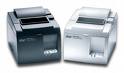
Finally, the impact printers don’t turn black from heat. This makes them ideal for hot kitchen environments.
Need a louder printer so your staff can hear when an order is up? Kitchen buzzers can help your staff hear when the order comes through. They work on both the impact and the thermal printers.
Posted in Hardware, POS Features Tagged with: kitchen, printer, red/black
Make Life Easier with Barista & Kitchen Monitors
Barista or Kitchen monitors can make life much easier in a busy coffee shop or restaurant. Because we are working with a monitor, we can really have more features than a simple printed receipt or make ticket can provide.
Let’s look at some of the benefits a monitor system can provide.

First these monitors can be FAST. Because you can choose to have the order displayed in real time, the barista or cook can start the order as the customer is placing it. Perfect for getting a head start!
See the forest and the trees! Monitors help staff focus on all orders as they come in. If a barista sees three mocha’s they can get those started at the same time.
Stay on top of dine in vs to go. You can split the screen and show your dine in orders on the top and then the to go or drive thru orders on the bottom. This allows you to manage what orders you are focusing on. Move those impatient drive thru and to go people through faster.
Double duty. Instead of splitting the screen by order type, split it by item. Drinks on top and food on the bottom.
Monitor speed. Because we display the time the order has been on the screen, it is easy to monitor the speed in which tickets are bumped from the monitor. This also allows you to make sure that you are not falling behind!
Posted in Hardware, Order Entry, POS Features Tagged with: barista, kitchen
Additional Equipment from SelbySoft
Do you know that SelbySoft carries a full line of equipment for your store? I’m not just talking about our full point of sale equipment and software but the additional items you might need in the future.
We typically stock:
- Cash drawers in two versions along with extra drawers, locking lids and extra keys.
- Paper for thermal, sticky rolls, plain paper.
- Labels for bar codes, box labels and cup labels.
- Printers, including sticky, thermal, plain paper, box label and report printers.
- Bar code scanners.
- Order confirmation monitors.
- Kitchen & Barista monitors with bump bars.
- Touch screens.
- Scales for retail.
- Ribbons for printers.
- Fingerprint ID.
- Employee cards
And much more! Give us a call for more information!
Posted in Hardware Tagged with: peripheral, supplies
Barista & Kitchen Monitor Upgrades
Recently, we made some changes to how our barista and kitchen monitor system works.
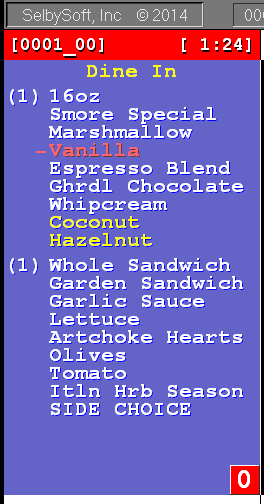
The first change regards forced modifiers. For those of you that are not printing the standard specialty ingredients, we are now showing the forced modifiers.
We are also now highlighting any additions to standard specialty items.
Posted in Hardware, Order Entry Tagged with: barista monitor
What to Consider When Looking at POS
Looking to buy a POS system? Great! It is a big decision and we realize that it can a little overwhelming. I thought it would be helpful (and a little fun) to move through some of the common configurations that we see out there and detail some things to think about when looking at a POS system.
Let’s take this through a couple different concepts and propose some questions for you:
Dedicated Drive Thru:
If you have a dedicated drive thru, do you need to have two separate POS terminals or can you use one POS station for both windows. If you start with one, and have a double sided drive thru, get pricing on what an additional station would be down the road. You ARE going to be busy enough at some point right?
If you are using one POS in the drive thru, then maybe you want to look at multiple drawers on one station. That will allow you to keep cash accountability with the employees.
Who will be making the drinks and how close to the window(s) is the espresso machine? Are you going to remember or call out drinks? If not, then you will want to either print a slip out of the receipt printer or have a dedicated barista printer / monitor. A lot of this depends on the volume you will be doing.
Do you plan on doing any line busting with the cars that are stacked in the drive thru lane? If so, then a tablet may come into play for efficiency.
Cafe:
The first question with a cafe is: Are you carrying food? If so, will this be grab and go items from a cold case or are you going to be prepping or building sandwiches or other items? If you have a kitchen, then we will want to have a kitchen printer or monitor. This way the kitchen operates independently of the front counter. Remember, anytime your staff needs to walk away from the POS, they are also walking away from the customer. You could use the receipt printer to print a sandwich ticket but that would have your employee running back and forth and losing that important face time with your customer.
All of the above holds true with the espresso machine as well. If that is not right next to the POS system, then you should look at a separate printer or monitor for that as well.
What about expediting the order? If you have a sandwich and a drink, how will you put them together so that you can put the whole order together. Can you print a separate slip out of the receipt printer? We have the ability to also include the other printer stations on the ticket (Barista ticket says that there is food / food ticket says there are drinks).
Will you have retail? How much? Our general rule of thumb is that once you get over about 100 unique retail items you may want to look at a scanner for the POS station. But retail does not stop at a scanner. If you are selling bean by the pound or loose leaf tea, then you will want to look at an integrated scale system.
If you have a drive thru attached to the cafe, then you may want to look at a 2nd point of sale terminal for that aspect of the business. I’d always recommend checking what the price is for down the road.
Are you going to be doing any outside seating or plan on having a busy line? A tablet for line busting might make sense. If you are having one POS station, you may also want to look at multiple cash drawers for the cash accountability side of things.
Will you have any seating? Will you call out the customers name or ticket number after they order at the counter? Or, are you going to give them a table tent and then bring the order to the customer. In some cases we have customers that add beer and wine and then even handle a little bit of table service during some times of the day. Do you need to make sure that you have a table service option for down the road?
Phones, timed orders and catering. Will you have people order over the phone? Do you need to have customer and phone number tracking so you can record those orders? Are you in an area with a lot of pharmaceutical reps or warehouse / factory locations? If so, you may have people that order early in the day and want it ready for lunch. Do you need to make sure your POS can automatically print those orders 30-60 minutes before they are due (hint: we handle that)? When it comes to catering, do you need to be able to provide price quotes and even the ability to deliver to multiple addresses?
Delivery:
Are you going to offer delivery? Will you have dedicated delivery drivers? You might want to consider if you can pay them different wages when they are delivering as opposed to when they are working in the store. Speaking of payments, how will you re-reimburse a driver? By mileage, per ticket, percentage or something else?
If you are doing a lot of delivery, then you will most likely look at a boxlabel printer so you can tag each box or bag with the address etc. You could use that tag as the delivery driver receipt but you also might want a separate driver printer or slip.
Two other things to consider and ask:
Credit Cards: Can you use any credit card processing company? If not, how negotiable are the rates now and in the future? It’s ok to go with your POS companies preferred processor as long as you have the ability to re-negotiate later on.
Gift Cards: Is there a monthly or per swipe charge (there should not be). Is it done directly? In the cloud? Through the credit card processor? Keep in mind that you typically want that kept separate from the processor so you don’t have issues if you decide to switch processors.
Whew! Hopefully this helps in figuring out what you may need for opening and what you should think about for the future. If you have any questions, don’t hesitate to call us!
Posted in Hardware Tagged with: configuration, hardware
XP End of Life & SelbySoft
If you have followed any tech news in the last couple months you have seen that Microsoft is no longer supporting Windows XP. We have had questions from our customers about how this affects them and I thought it would make a perfect blog post as we have gone through this before with the end of lifing of Windows 2000 and Windows 98.
There are a couple of potential issues that anyone using Windows XP needs to be aware of:
- As of April 2014, Microsoft has ended support for Windows XP. This, in itself, is really not a big deal as you have probably never actually contacted Microsoft for support before.
- Security updates end. This is the real issue with Microsoft ending support. Because XP will not receive any updates, your PCI security may be compromised. This means that if you do have a breech with your credit card system, you may be held responsible for the consequences of that breech.
- Updates. Currently, SelbySoft will still develop for backwards compatibility. This will change however in the future. At some point, it will become necessary for us to end backwards compatibility however.
- Compatibility and drivers. We know from past experience that device drivers are one of the first things to have issues. Point of sale hardware manufacturers simply don’t usually write backwards compatible drivers.
- OS compatibility will also suffer down the road. For the last couple of years there has been severe trouble trying to get newer operating systems (Windows 7 & 8) to work well with older systems. This will become more difficult with Windows XP and 7/8 in the future.
Need help deciding what the implications are of running on XP past the deadline? Call us!
Save Paper with Remote Monitors from SelbySoft
If you have a kitchen or remote barista station, there is a chance that you are going through a ton of paper a year. Did you know that, based on an arbitrary ticket length of five inches, there are:
- 520 tickets on average in a thermal roll. 220 feet of paper.
- 396 tickets on average in a plain paper roll. 165 feet of paper.
Exciting stuff!
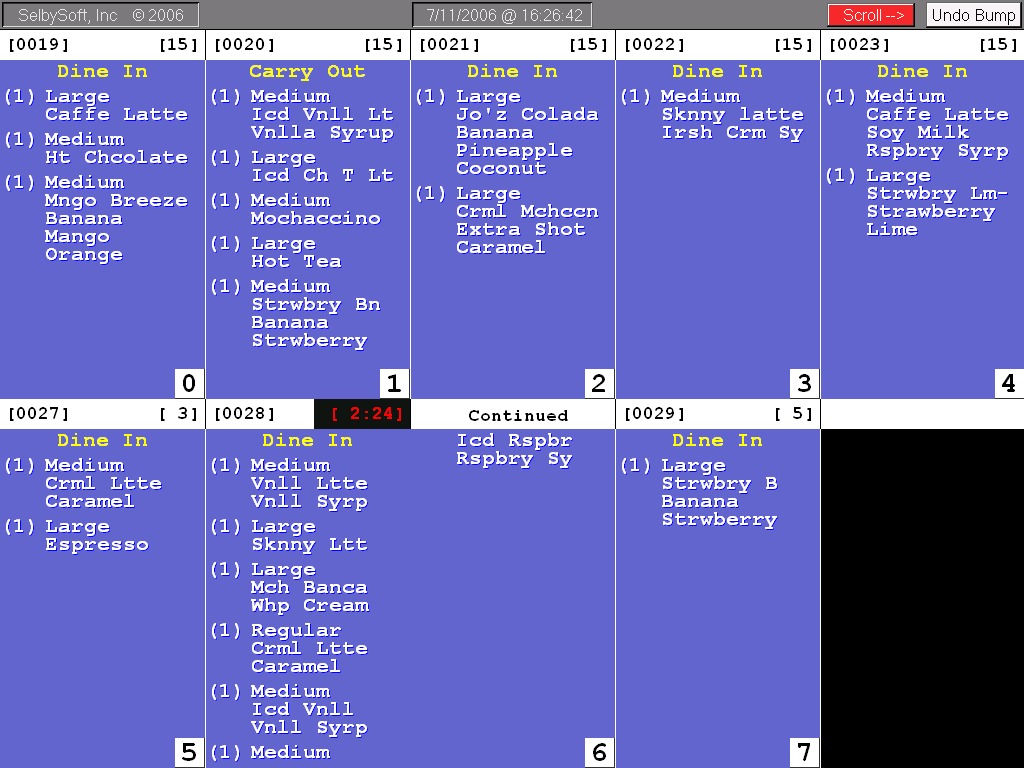
Seriously though, replacing that printer with a barista or kitchen monitor might be better in the long term. Kitchen monitors have the following advantages:
- No paper.
- The order can’t be dropped or lost. If it is marked done, it can be undone.
- You can see up to ten orders on the screen at a time.
- You can easily break up by category or by order type.
- You can set a timer for when the order has been sitting too long.
Barista Monitor
Posted in Hardware, Order Entry, POS Features Tagged with: barista monitor, kitchen monitor
Remote Printing In SP-1
We think a lot about how our customers use our Point Of Sale system. Printing is one of those areas that we really tried to make sure we covered all the bases. Printing to remote printers is incredibly helpful if you have a Barista in that is 5-10 feet down the counter or if you have a separate kitchen area.
SP-1 has the ability to support multiple types of remote printers or displays for your Kitchen, Barista or Delivery staff. It starts with the flexibility of the SP-1 program itself. SP-1 has been designed to be able to specify when and where items are printed or displayed. This can be designated by the specific menu items as well by including by any of the following:
Menu Groups (Coffee, Sandwich, Pizza)
Group Sizes (small, medium, large)
Specialties (Mocha, Latte, Garden Sandwich)
This means that you can specify that the Coffee goes to the Barista and the Sandwich goes to the Kitchen printer or monitor.
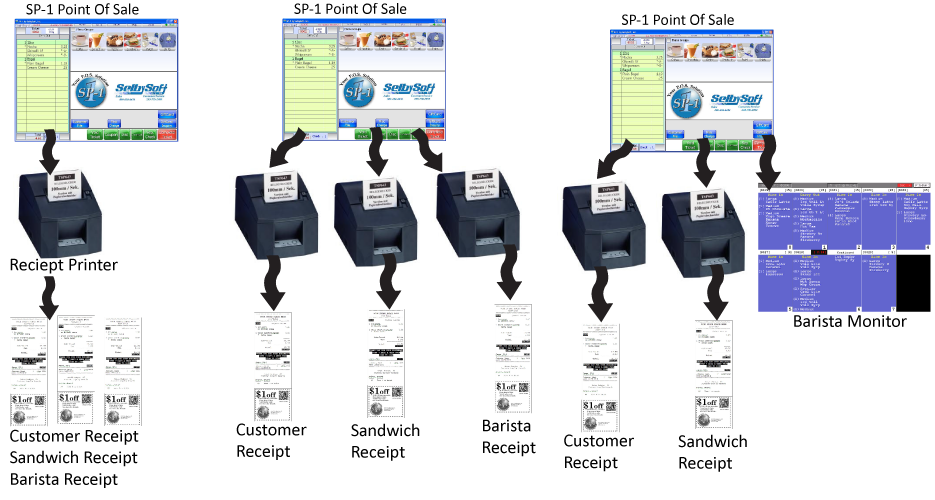
In addition, we can also specify that any of the printers print multiple receipts. Here are a couple of examples:
Single Station with one printer: You can print a receipt, Barista ticket and kitchen ticket from the same printer.
Single Station with three printers: You can print a receipt at the counter, Barista ticket at the espresso machine and sandwich receipt in the kitchen.
Additionally, SelbySoft offers other printing options:
Printers with red/black ink for highlighting (useful for kitchens).
Thermal Printers with logo printing and coupon printing directly on the receipt.
Sticky thermal paper that will stick right to a cup.
Boxlabel printers for sandwich bags.
Finally, the option of forgoing a printer for the kitchen or barista and use a monitor with a bump bar instead. This system will allow you to see up to ten orders on the screen at a time! This screen can also be setup to only show certain menu items just like the printers. These are a great tool in high volume locations.
http://www.youtube.com/watch?v=4ihtGU8GPkI&feature=g-upl
Posted in Hardware, Order Entry, POS Features Tagged with: barista monitors, kitchen monitors, printing, Remote printing
Caller Id for Deliveries and Pickup!
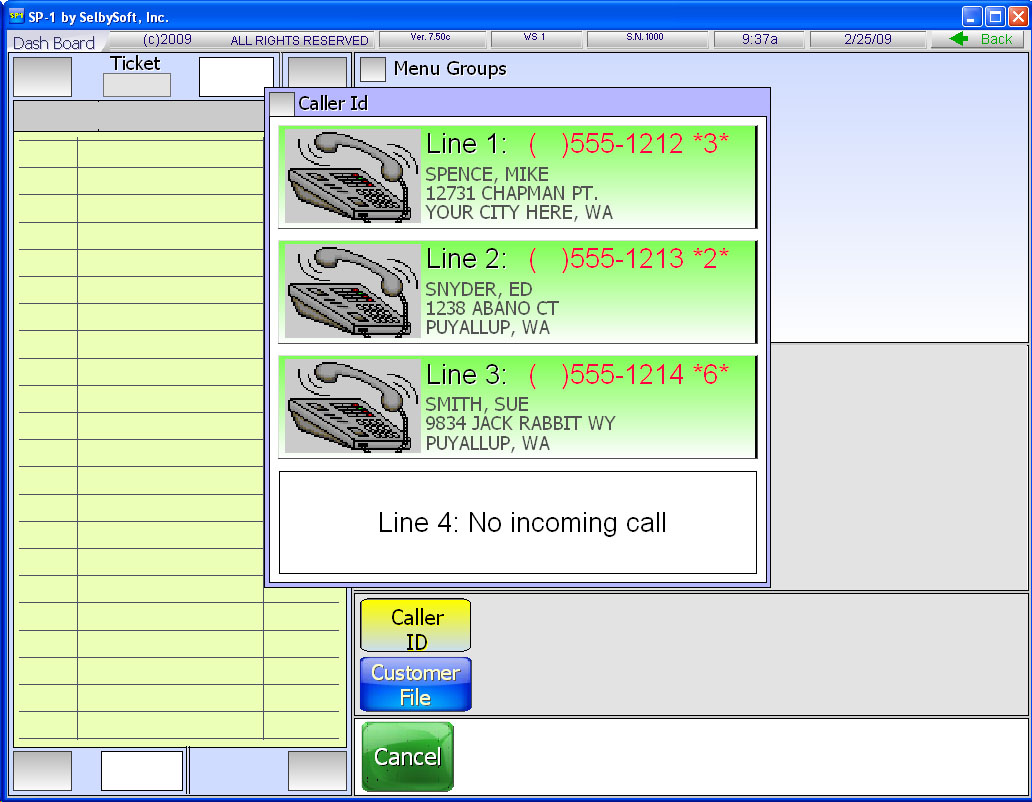
Do you take phone orders? If so, you can save your staff time by implementing a Caller Id system. SelbySoft has a fully integrated Caller ID system that allows your employees to see who is calling in!
This caller id system will appear when the phone rings. SP-1 will show you the customer name and phone number. If that customer is already in your customer database, the address will be shown as well.
When you select the appropriate button, SP-1 automatically pulls up the customer and shows you their information and last order. That eliminates having to enter the entire phone number when you answer the phone.
If the customer is not in the database then you have the option to add that customer. Once you add, the name and phone number information are automatically added to the customer file by the caller id system. That eliminates having to re-type that information in.
Give us a call if you would like to explore this option more fully! There are some neat little factoids for you about Caller ID below!
 Theodore George “Ted” Paraskevakos from Greece, was the first person to patent caller id technology. This happened in 1968. From 1969 to 1975 he was granted 20 or so patents on that technology.
Kazuo Hashimoto, a Japanese inventor with over a 1,000 patents built the first prototype caller id display. That is now on display in the Smithsonian!
Posted in Delivery, Hardware, Order Entry Tagged with: caller id